Available for iPhone

Reverse Image Search Made Simple

One upload. Every insight.

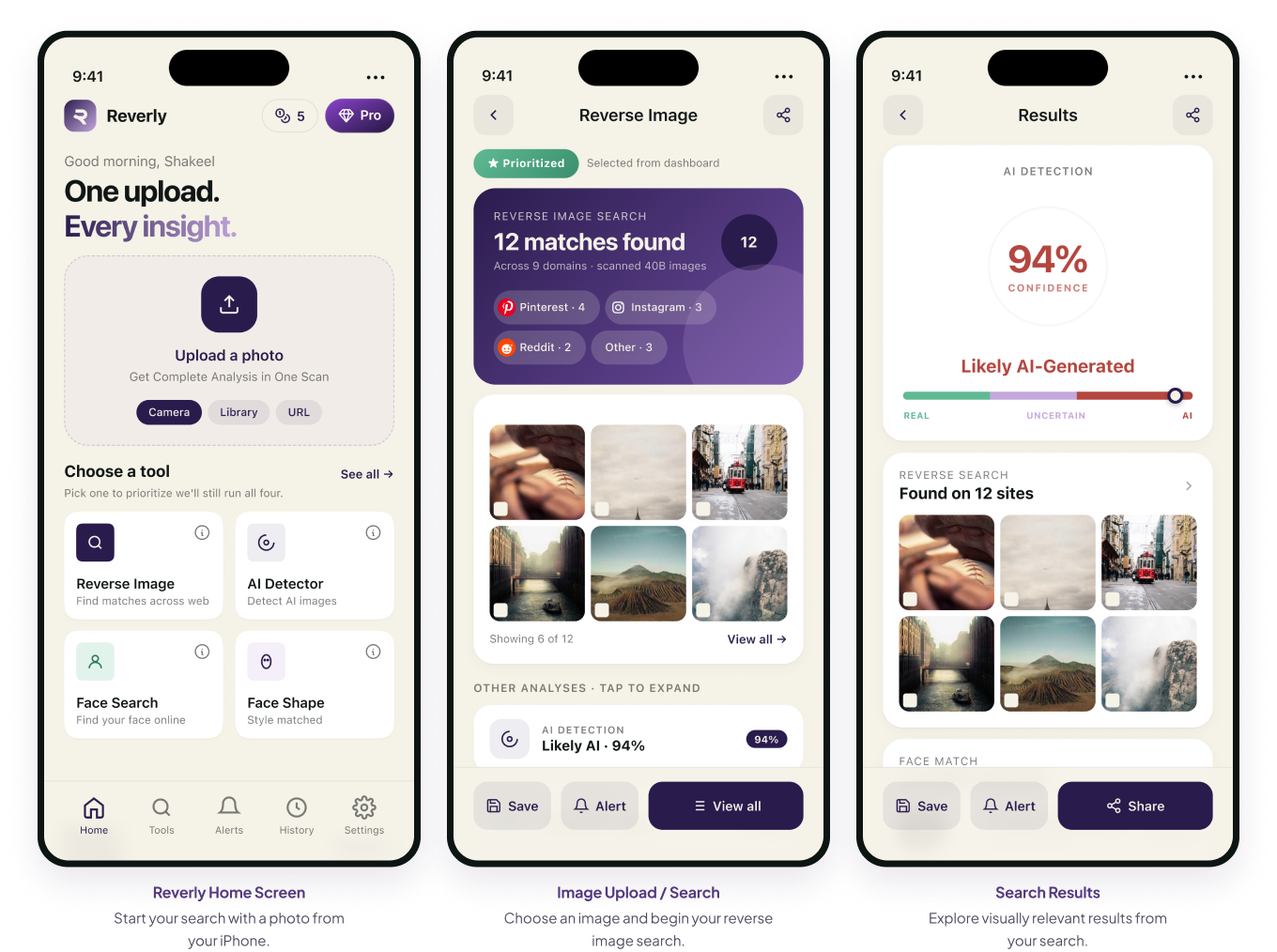
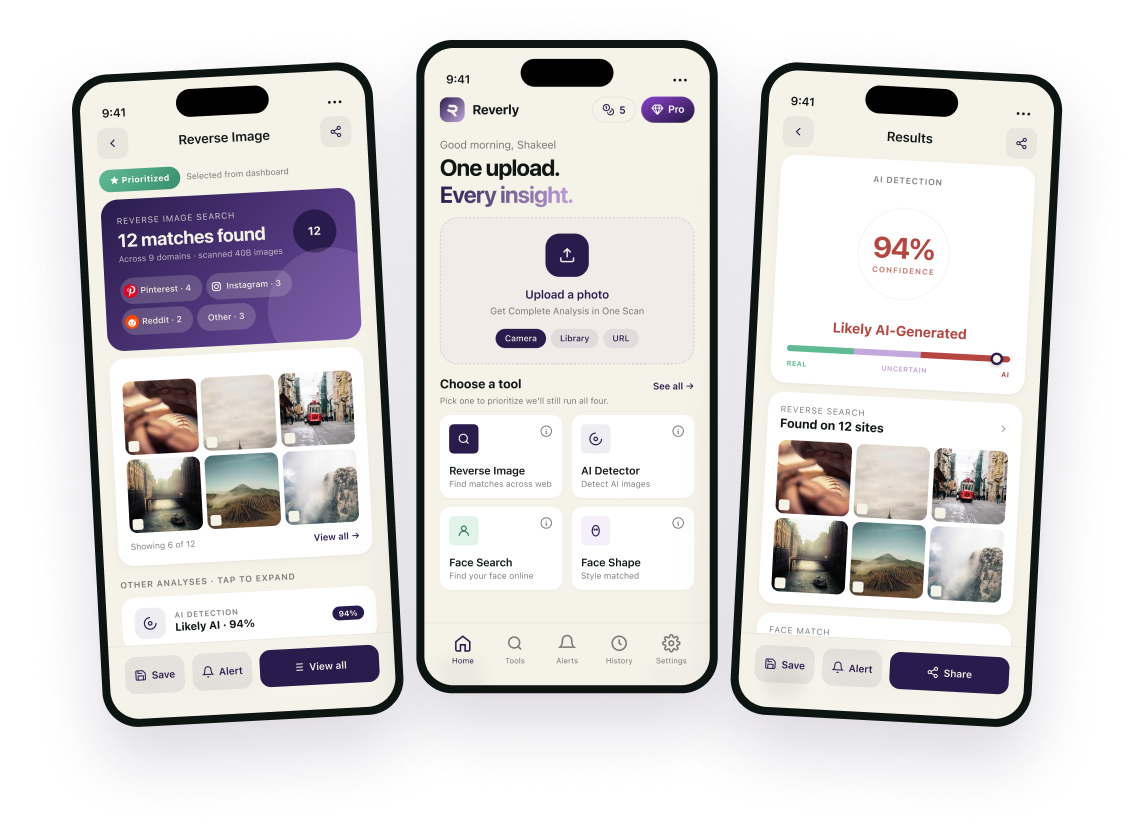
Reverly makes it easy to search the web using an image instead of words. Upload a photo or choose one from your iPhone, and Reverly looks for copies of it across publicly indexed web pages. Find out where a photo has been reposted, check whether an image was AI-generated, or simply explore what a picture leads to.

Available for iPhone.
Revery App

Use Reverly To Search,
Analyze & Discover

You shouldn't need five different apps to understand one image. Reverly brings
powerful visual-search and AI analysis tools together in one place.

Reverse Image Search

Find where your image appears across the web.

Upload a photo and discover matching or related images online. Reverly helps you investigate where an image has been posted, shared,or reused.

AI Image Detector

Wondering whether an image was created or modified with AI?

Use Reverly's AI Detector to analyze an image and see its AI-generated likelihood, along with supporting analysis signals.

Face Search

Your photo is the search query.

No keywords, no guessing. Upload a picture and Reverly scans publicly indexed web content for copies of it, then shows you where they appear.

Face Shape Detector

Find out your face shape in seconds.

A quick, approximate estimate - oval, round, square or heart. For fun only, not a professional assessment.

Accurate Search Across
a Massive Image Index

40B+

Images Scanned

Reverly is built for large-scale visual discovery, helping you explore visually relevant content across a massive collection of images.

99%+

Accuracy

Designed to provide highly accurate AI image detection and help you identify potentially AI-generated content.

How Reverly Works

Searching with Reverly is designed
to be simple.

No complicated search operators. No need to know the
exact name of a person or image.

Just start with the picture.

1

Choose Your Image

Select a photo from your Photo Library, take a picture with your Camera, browse your Files, or paste an image URL.

2

Choose Your Tool

Select the type of visual analysis you need, including Reverse Image Search, Face Search, or AI Image Detection.

3

Let Reverly Analyze It

Upload your image and let Reverly process it to find relevant visual information and results.

4

Explore Your Results

Review matches, compare images, investigate sources, and follow the information that's useful to you.

Key Features

AI Image Analysis

AI Image Detection

Check whether an image was generated or modified using AI, with a confidence score for every result.

User-friendly Experience

Reverly is built for mobile users. Choose a photo, search, and explore without unnecessary steps.

Supports Multiple Formats

Supported image formats include JPG, PNG, and HEIC, with uploads shown in the app supporting files up to 20 MB.

Face Shape Detector

Explore facial characteristics with Reverly's Face Shape Detector.

Real-Time Alerts

Stay informed about relevant activity and findings with real-time alerts.

See Reverly in Action

Unlock More With Reverly PRO

Get full access to advanced image search, AI detection, face search, and additional premium tools.

FEATURE WEEKLY MONTHLY YEARLY
Reverse Image Search ✓ ✓ ✓
AI Image Detector ✓ ✓ ✓
Face Search ✓ ✓ ✓
Face Shape Detector ✓ ✓ ✓
Real-Time Alerts ✓ ✓ ✓
Priority 24/7 Support ✓ ✓ ✓
Searches 5 20 240
Billing Weekly Monthly Annually
Free Trial — 3 days —

Sometimes You Have the Image,
But Not the Answer

A picture can raise questions that keywords can't easily answer.

You may have found an unfamiliar photograph online, received an image without context, recognized a face but not know where you've seen it before, or simply want to discover whether similar versions of a picture exist elsewhere.

That's where visual search can help.

Reverly lets you start with the visual information you already have instead of trying to describe it with the perfect search phrase.

Your photo is the search query

What Can You Use Face
Reverse Image Search For?

01

Finding Similar Images

Discover visually similar photographs and compare different versions of an image.

02

Investigating an Unfamiliar Photo

Have an image but very little context? Reverse image search gives you another way to investigate it.

03

Discovering Image Sources

Search for additional information around an image and explore where visually related content appears.

04

Exploring Public Images

When you come across an interesting publicly available photograph, use image search to explore related visual results.

05

Checking Your Own Photos

Search an image you own to investigate whether visually similar versions or related public results exist online.

06

Everyday Visual Discovery

Sometimes you simply want to see what a picture leads to. Reverly makes that exploration easy.

Results can vary depending on image quality, availability of matching content, and the information accessible online.

Frequently Asked Questions

It lets you search using an image instead of text. Upload a photo and Reverly looks for copies of it across publicly indexed web pages.

Copies of the image you upload — reposts, crops, and resized versions — along with the public pages where they appear.

No. Reverly uses a standard image matching algorithm and cannot identify anyone.

Because it's designed for searching photos that contain people. It's the same matching technology applied to any image.

Yes, you can upload a supported image and use it for searching.

JPG, JPEG, and PNG.

Yes. Reverly is available as an iPhone app.

It analyses an image for signs that it was generated or modified using AI, and returns a confidence score.

AI detection results are estimates and may not always be completely accurate.

Search history is off by default. While it's off, your image is never written to our servers. Turn it on and your searches are saved until you delete them.

Check current pricing and trial options in the app.

Start With a Photo.
Discover More With Reverly.

Reverly gives you a simple way to explore images, faces, and visually related results from your iPhone.

Reverly search results may vary depending on image quality, available online content, and other factors. Use image and face search responsibly and respect people's privacy and applicable laws.

Get Reverly and start your search now!
Download Reverly on the App Store

Available for iPhone.